




PCB corrosion is one of the most common reasons electronic products become unstable, fail intermittently, or stop working completely. It can appear after water exposure, battery leakage, high humidity, flux residue, salt spray, poor storage, or long-term operation in harsh environments. To clean PCB corrosion safely, always disconnect power first, inspect the damage, remove loose residue, clean with electronics-safe materials, dry the board completely, and verify continuity before powering it again.
For engineers, repair technicians, OEM buyers, and electronics manufacturers, cleaning corrosion is only part of the solution. The more important question is why the corrosion happened and how to prevent it in future PCB design, fabrication, assembly, storage, and end-use environments.
What Is PCB Corrosion?
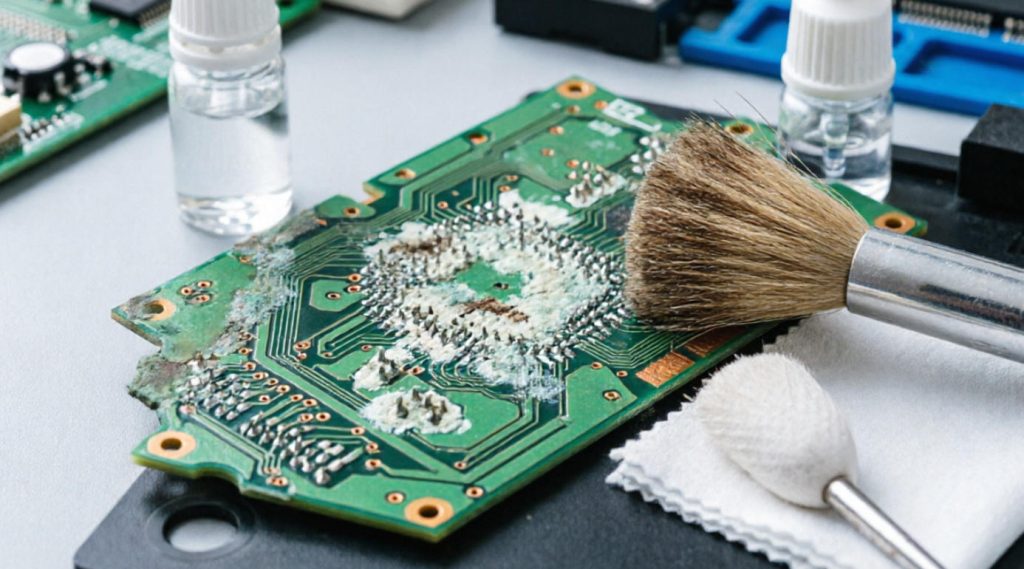
PCB corrosion is the chemical or electrochemical degradation of metal areas on a printed circuit board. It usually affects copper traces, solder pads, vias, component leads, connectors, battery contacts, shielding parts, and exposed plated surfaces.
Corrosion may appear as green, blue-green, white, black, gray, brown, sticky, powdery, or crystalline residue. On copper, green corrosion often indicates copper oxidation or copper salts. White crusty residue may come from battery leakage, moisture reaction, or dried ionic contamination. Blackened pads or pitted surfaces may suggest severe oxidation, chemical attack, or long-term environmental damage.
A corroded PCB is not only dirty. Corrosion can increase resistance, break copper traces, create leakage current, cause short circuits, damage components, and reduce product reliability. In high-reliability applications such as automotive electronics, medical devices, industrial control systems, LED lighting, telecom equipment, and power electronics, even minor corrosion can become a serious field failure risk.
Why PCB Corrosion Matters for Electronics Reliability
PCB corrosion matters because it directly affects electrical performance and long-term reliability. A board may still power on after corrosion, but hidden damage can cause intermittent faults, unstable signals, charging failure, communication errors, or sudden shutdown.
In consumer electronics, corrosion often appears after liquid spills, sweat exposure, battery leakage, or humid storage. In automotive electronics, it may affect control modules, sensors, battery management systems, lighting boards, charging units, and ADAS-related circuits. In industrial equipment, corrosion can cause downtime, false sensor readings, relay failure, or unstable motor-control signals.
For OEM manufacturers and buyers, PCB corrosion is also a warning sign in the supply chain. It may indicate poor surface finish selection, insufficient cleaning after assembly, weak conformal coating coverage, inadequate packaging, improper storage, or operation beyond the intended environmental rating.
How PCB Corrosion Happens
PCB corrosion usually needs four conditions: exposed metal, moisture, oxygen or chemicals, and contamination. When ionic residues dissolve in moisture, they can become conductive. If voltage is present, electrochemical reactions may accelerate corrosion and even form conductive dendrites between pads.
Common causes include:
- Battery leakage from alkaline, lithium, or rechargeable cells
- Water exposure from spills, rain, condensation, or washing damage
- High humidity during storage or operation
- Flux residue after soldering or rework
- Salt spray in marine, coastal, or outdoor equipment
- Acidic or alkaline chemical contamination
- Industrial gases, sulfur compounds, or corrosive vapors
- Damaged solder mask exposing copper
- Poor enclosure sealing or insufficient conformal coating
- Improper PCB packaging before shipment
The key point is simple: corrosion is rarely random. It usually reveals a design, process, material, storage, or environmental control issue.
Common Types of PCB Corrosion
Different corrosion patterns require different cleaning and repair strategies. Identifying the type helps avoid unnecessary damage during cleaning.
| Corrosion Type | Typical Appearance | Common Cause | Repair Difficulty |
|---|---|---|---|
| Copper oxidation | Green or blue-green stains | Moisture, exposed copper, damaged solder mask | Medium |
| Battery leakage corrosion | White, crusty, powdery, sticky residue | Leaking batteries near PCB or contacts | Medium to high |
| Flux residue corrosion | Amber, brown, sticky, cloudy residue | Active flux not fully cleaned | Low to medium |
| Galvanic corrosion | Localized metal loss around mixed metals | Moisture plus dissimilar metals | High |
| Electrochemical migration | Fine metallic dendrites or leakage paths | Voltage, humidity, ionic contamination | High |
| Connector corrosion | Dull, dark, pitted, or unstable contacts | Humidity, oxidation, poor plating | Medium |
| Salt contamination | White crystals, green copper salts | Marine, coastal, outdoor exposure | High |
If copper traces are already broken, vias are destroyed, pads are lifted, or components are internally damaged, cleaning alone will not restore the circuit. The board may require trace repair, jumper wiring, pad rebuilding, component replacement, or full PCB replacement.
Tools and Materials Needed to Clean PCB Corrosion
Use electronics-safe tools and avoid aggressive household cleaning materials. The wrong cleaning method can lift pads, damage solder mask, trap moisture under components, or leave conductive residue behind.
Recommended tools and materials:
- High-purity isopropyl alcohol, preferably 90% or higher
- ESD-safe soft brush or clean toothbrush
- Lint-free wipes or foam swabs
- Distilled water for selected water-soluble contamination
- Electronics contact cleaner for compatible connectors
- Compressed air or low-pressure clean air
- Magnifier, microscope, or inspection camera
- Multimeter for continuity and resistance checks
- ESD wrist strap and ESD-safe work surface
- Drying oven or controlled warm-air drying for professional repair
Avoid:
- Tap water
- Household detergent
- Vinegar on unknown PCB assemblies
- Steel brushes
- Sandpaper on fine-pitch circuits
- Excessive scraping
- High-pressure air under small components
- Powering the PCB before it is fully dry
For battery leakage, some residues may need neutralization depending on battery chemistry, but careless use of acids or bases can damage the board. If the board is valuable or safety-critical, professional inspection is safer.
How to Clean PCB Corrosion Step by Step
The safest process is to disconnect power, document the damage, remove loose residue, clean gently, dry completely, inspect carefully, and test before power-up.
Step 1: Disconnect Power Immediately
Turn off the device, disconnect the power source, remove batteries, unplug cables, and discharge large capacitors if necessary. Never clean a powered PCB. Moisture and cleaning liquids can create short circuits, and corrosion may already have formed conductive paths.
If the PCB comes from a high-voltage product, power supply, inverter, charger, UPS, EV module, or industrial controller, follow proper electrical safety procedures. Do not touch high-voltage sections unless you are trained to service them.
Step 2: Take Photos Before Cleaning
Before removing residue, take clear photos from multiple angles. This helps you compare before-and-after conditions, identify missing components, trace damage, connector orientation, and possible root causes.
Photos are also useful for communication between repair technicians, PCB assembly suppliers, OEM buyers, and quality teams. In batch production, visual records help determine whether corrosion is a single incident or a systemic process issue.
Step 3: Remove Loose Corrosion Carefully
Use a soft ESD-safe brush, foam swab, or lint-free wipe to remove loose powder, crystals, or flakes. Work gently around fine-pitch ICs, small passive components, and fragile pads. Do not scrape aggressively unless the corroded metal area is clearly isolated and replaceable.
If corrosion is around connectors, battery terminals, or mechanical contacts, inspect for pitting and loss of plating. Cleaning may improve contact temporarily, but deeply pitted contacts often need replacement.
Step 4: Clean with Isopropyl Alcohol or Suitable Electronics Cleaner
Apply high-purity isopropyl alcohol to the affected area using a swab or soft brush. Gently loosen residue and wipe it away. Repeat until visible contamination is removed. For dense assemblies, avoid flooding the board unless you have a controlled drying process.
For water-soluble contamination, distilled water may be used first in professional cleaning workflows, followed by isopropyl alcohol and thorough drying. Never use tap water because minerals can leave conductive residues.
Step 5: Inspect Pads, Traces, Vias, and Components
After cleaning, inspect the PCB under magnification. Look for broken traces, lifted pads, darkened solder joints, exposed copper, damaged vias, cracked components, or residue trapped under IC packages.
Use a multimeter to check continuity across suspicious traces and resistance between nearby pads. If a trace is open, it may need jumper repair. If resistance remains abnormally low between nets, hidden contamination or component damage may still exist.
Step 6: Dry the PCB Completely
Drying is one of the most important steps. Moisture trapped under components can cause new corrosion or short circuits after power is restored. Use clean compressed air, room-temperature drying, or controlled warm-air drying. For professional repair, a low-temperature drying oven may be used according to component limitations.
Do not use excessive heat. High heat can warp the PCB, damage plastic connectors, weaken adhesives, or reduce component reliability.
Step 7: Test Before Powering the Board
Before applying power, verify that the board is dry and visually clean. Check for shorts between power and ground, confirm continuity on repaired traces, and inspect connectors. If possible, power the board using a current-limited bench supply rather than connecting it directly to the original power source.
If current draw is abnormal, stop immediately and inspect again. A corroded board may contain hidden faults even after visible residue has been removed.
How to Clean Battery Corrosion on a PCB
Battery leakage is a common cause of PCB corrosion in remote controls, toys, medical devices, portable instruments, backup power modules, IoT devices, and consumer electronics. Leaked battery chemicals can spread along copper traces and under components.
First, remove the batteries and dispose of them properly. Wear gloves and avoid touching residue directly. Remove loose powder with a swab or soft brush. Clean the affected area with electronics-safe materials, then inspect battery contacts, copper traces, and nearby components.
Battery corrosion is more serious when leakage reaches vias, IC pins, connectors, or multilayer PCB structures. If the board still fails after cleaning, the cause may be an open trace, damaged component, or corrosion hidden under solder mask.
How to Clean Water-Damaged PCB Corrosion
Water damage can be mild or severe depending on the liquid type. Clean water exposure is less damaging than salt water, beverages, sweat, coolant, industrial liquid, or chemical contamination. The longer the board remains wet, the higher the risk of corrosion and electrochemical migration.
For water-damaged PCBs, disconnect power immediately and do not attempt to turn the device on to check whether it still works. Remove visible moisture, clean contamination, and dry the board thoroughly. If the board has been exposed to salt water or corrosive liquid, professional cleaning and inspection are strongly recommended.
In production environments, water-related corrosion often points to weak enclosure design, insufficient sealing, unsuitable conformal coating, or an environmental rating that does not match the actual application.
Can a Corroded PCB Be Repaired?
A corroded PCB can sometimes be repaired, but repairability depends on the damage depth and circuit complexity. Light surface contamination is often cleanable. Moderate corrosion may require component replacement, connector replacement, solder rework, or trace repair. Severe corrosion may make the PCB unreliable even after cleaning.
A PCB is more likely to be repairable if:
- Corrosion is limited to surface residue
- Copper traces remain continuous
- Vias are not destroyed
- Components are not internally damaged
- The board substrate is not carbonized or delaminated
- Connectors and contacts can be replaced
A PCB may need replacement if:
- Multiple traces are missing or severely pitted
- Corrosion has spread under large IC packages
- Internal layers are suspected to be damaged
- The board still has leakage current after cleaning
- Safety-critical operation cannot be guaranteed
- The repair cost exceeds replacement cost
PCB Corrosion Prevention Methods
Preventing PCB corrosion is more reliable and cost-effective than repairing it after failure. Good prevention starts from design and continues through fabrication, assembly, cleaning, coating, packaging, storage, and final application.
Effective prevention methods include:
- Use suitable surface finishes such as ENIG, immersion tin, immersion silver, HASL, or OSP based on application needs
- Keep copper protected with proper solder mask coverage
- Remove active flux residue after soldering when required
- Apply conformal coating for humid, outdoor, marine, automotive, or industrial environments
- Improve enclosure sealing and ventilation design
- Use corrosion-resistant connectors and plated contacts
- Control humidity during storage and shipping
- Use moisture barrier bags, desiccants, and proper packaging
- Avoid trapping process chemicals under components
- Perform cleanliness testing for high-reliability assemblies
For OEM and ODM projects, corrosion prevention should be reviewed during the design-for-manufacturing stage, not after mass production. Material selection, coating choice, cleaning process, and reliability testing all affect long-term performance.
PCB Materials, Surface Finishes, and Corrosion Resistance
PCB corrosion resistance is strongly influenced by base material, copper thickness, solder mask quality, surface finish, plating quality, and final operating environment. FR-4 is widely used for general electronics, while high-frequency materials, metal-core boards, ceramic substrates, and flexible circuits may be selected for special applications.
Common PCB surface finishes include:
| Surface Finish | Main Advantage | Corrosion Consideration |
|---|---|---|
| HASL | Cost-effective and widely available | May be less suitable for fine-pitch designs |
| ENIG | Flat surface and good solderability | Requires controlled plating process |
| OSP | Low cost and lead-free friendly | Sensitive to handling and storage conditions |
| Immersion Silver | Good conductivity and flatness | Can tarnish if storage is poor |
| Immersion Tin | Flat surface and solderability | Requires careful shelf-life control |
No surface finish is perfect for every environment. The right choice depends on cost, solderability, shelf life, fine-pitch requirements, operating humidity, contact reliability, and product lifetime expectations.
Quality Standards and Testing for Corrosion Control
Professional PCB manufacturing and assembly use process controls and testing methods to reduce corrosion risk. Relevant quality systems and standards may include ISO 9001, ISO 13485 for medical-related production, IATF 16949 for automotive-grade production, UL certification, RoHS compliance, IPC workmanship standards, and customer-specific reliability requirements.
Common inspection and testing methods include:
- Visual inspection under magnification
- Automated optical inspection
- Ionic contamination testing
- Surface insulation resistance testing
- Thermal cycling
- Humidity testing
- Salt spray testing for selected applications
- Cross-section analysis
- Solderability testing
- Electrical continuity and functional testing
For high-reliability electronics, corrosion control should be built into the quality plan. Testing is especially important for automotive, medical, industrial, communication, outdoor LED, energy storage, and power electronics products.
Common Failure Analysis Findings in Corroded PCBs
Failure analysis helps identify whether corrosion came from design weakness, manufacturing process residue, environmental exposure, poor packaging, or misuse. Without root-cause analysis, the same failure may repeat in future batches.
Common findings include:
- Flux residue left under components after rework
- Damaged solder mask exposing copper traces
- Insufficient conformal coating around connector edges
- Condensation inside sealed enclosures
- Battery leakage spreading under nearby components
- Salt contamination on outdoor or marine electronics
- Poor packaging during long-distance shipping
- Improper storage in high-humidity warehouses
- Mixed-metal contact corrosion in connector systems
A useful failure report should include photos, contamination location, suspected root cause, electrical test results, cleaning outcome, repair recommendation, and prevention actions for future production.
Industry Applications Where PCB Corrosion Prevention Is Critical
PCB corrosion prevention is important in almost every electronics industry, but some applications face higher environmental and reliability pressure.
Consumer Electronics
Smart TVs, wearable devices, headphones, cameras, gaming devices, smart home products, and appliance control boards often require compact PCB layouts, HDI boards, flexible circuits, and cost-sensitive manufacturing. Sweat, liquid spills, and humid storage are common corrosion risks.
Automotive Electronics
Battery management systems, vehicle control units, motor controllers, onboard chargers, ADAS modules, radar, cameras, lighting control, and cockpit electronics require high reliability, vibration resistance, thermal stability, and long service life. Automotive PCB corrosion can create serious reliability risks.
Communication Equipment
5G and 6G base stations, optical modules, switches, routers, server backplanes, satellite communication equipment, and RF front-end modules often use high-frequency and high-speed PCBs. Corrosion can affect impedance control, signal integrity, and long-term stability.
Servers and AI Computing
AI servers, GPU accelerator cards, FPGA boards, data center switches, and storage equipment use high-layer-count and high-speed PCB structures. Cleanliness, surface finish quality, and controlled storage are important for high-value assemblies.
Industrial Control and Automation
PLC systems, servo drives, inverters, industrial robots, machine vision systems, sensors, CNC equipment, gateways, and instruments often operate in high-humidity, dusty, vibrating, or chemically exposed environments. Corrosion prevention supports stable long-term operation.
Medical Electronics
Patient monitors, ultrasound equipment, endoscopy systems, MRI and CT electronics, in-vitro diagnostic equipment, portable medical devices, and implant-related electronics require high reliability, low noise, cleanliness, and strict quality control.
New Energy and Power Electronics
Solar inverters, energy storage converters, wind power converters, EV charging systems, UPS power supplies, and high-current control boards require strong thermal design, high voltage reliability, and corrosion-resistant construction.
Cost Factors in PCB Corrosion Repair and Prevention
The cost of PCB corrosion repair depends on board complexity, damage area, component density, layer count, trace width, component value, and whether the product is safety-critical. A simple battery contact repair may be inexpensive, while corrosion under a fine-pitch BGA, multilayer via structure, or high-voltage power section may be costly or impractical.
Prevention cost factors include:
- Surface finish selection
- Conformal coating material and process
- Cleaning process requirements
- Packaging and storage controls
- Connector plating quality
- Environmental testing requirements
- Material grade and laminate selection
- Inspection and quality documentation level
For OEM buyers, the lowest PCB price is not always the lowest total cost. If corrosion causes field returns, warranty claims, downtime, or brand damage, a better-controlled manufacturing process is usually more cost-effective.
How to Choose a PCB Manufacturer to Reduce Corrosion Risk
Choosing the right PCB manufacturer and assembly partner is important for corrosion prevention. A reliable supplier should understand materials, surface finishes, solder mask control, cleaning processes, conformal coating, packaging, and industry-specific reliability requirements.
When evaluating a PCB supplier, consider:
- Experience with your application industry
- Quality certifications such as ISO 9001, ISO 13485, IATF 16949, UL, and RoHS compliance
- Capability for PCB fabrication and PCBA assembly
- Process control for cleaning and contamination prevention
- Surface finish options and shelf-life management
- Conformal coating and protective treatment capability
- Testing methods for reliability-sensitive products
- Engineering support for design-for-manufacturing review
- Prototype-to-production support
- Global shipping and packaging experience
Thindry is a China-based PCB manufacturer and assembly service provider with experience in PCB design support, PCB prototyping, PCB manufacturing, component sourcing, and PCBA assembly. By integrating engineering review, automated fabrication, MES tracking, quality monitoring, and BOM optimization, Thindry supports global customers from prototype development to volume production.
Pre-Order Checklist for Corrosion-Resistant PCB Projects
Before placing a PCB or PCBA order, buyers and engineers should confirm the operating environment, reliability requirements, and protection strategy. This helps the supplier recommend suitable materials, finishes, cleaning methods, coatings, and test plans.
Recommended checklist:
- Define operating temperature and humidity range
- Confirm whether the product will face outdoor, marine, automotive, medical, or industrial environments
- Specify PCB material, copper thickness, layer count, and surface finish
- Confirm solder mask coverage and exposed copper areas
- Define whether conformal coating is required
- Clarify cleaning requirements after soldering
- Confirm connector plating and contact reliability requirements
- Request suitable packaging for long-distance shipping
- Define quality standards and testing requirements
- Share failure history if the project is a redesign or replacement
A clear specification reduces engineering changes, improves quotation accuracy, and lowers long-term corrosion risk.
Frequently Asked Questions About PCB Corrosion Cleaning
Can I clean PCB corrosion with isopropyl alcohol?
Yes, high-purity isopropyl alcohol is commonly used to clean PCB corrosion residue, flux residue, and light contamination. Use a soft brush or lint-free swab, clean gently, and dry the board completely before testing. However, alcohol cannot repair broken traces, damaged pads, or internally corroded components.
Is vinegar safe for cleaning PCB corrosion?
Vinegar is sometimes mentioned for battery leakage cleanup, but it is not always safe for PCB assemblies. It can leave residue or react with materials if not fully removed. For valuable, dense, or safety-critical boards, use electronics-safe cleaning methods or professional repair instead of household chemicals.
Can a corroded circuit board still work?
A corroded circuit board may still work temporarily, but reliability is uncertain. Corrosion can create hidden leakage paths, weak solder joints, open traces, or unstable connectors. Even if the board powers on, it should be inspected, cleaned, dried, and tested before continued use.
How do I know if PCB corrosion is too severe to repair?
Corrosion may be too severe if copper traces are missing, vias are destroyed, pads are lifted, components are damaged, or leakage current remains after cleaning. If corrosion spreads under ICs or into multilayer structures, replacement is often safer than repair, especially for critical products.
Can water damage cause PCB corrosion?
Yes, water damage can cause PCB corrosion, especially if the board remains powered or wet for a long time. Salt water, beverages, sweat, coolant, and industrial liquids are more damaging than clean water because they contain conductive or corrosive contaminants.
Should I power on a PCB after cleaning corrosion?
Do not power on the PCB until it is fully dry and inspected. Check for shorts between power and ground, confirm continuity, and verify that no residue remains under components. For safer testing, use a current-limited bench power supply when possible.
What causes green corrosion on a PCB?
Green corrosion usually indicates copper oxidation or copper salt formation. It often appears when exposed copper reacts with moisture, oxygen, flux residue, salt, or other contaminants. Damaged solder mask, poor storage, and humid environments can make green corrosion worse.
Can flux residue cause PCB corrosion?
Yes, some flux residues can absorb moisture and become conductive or corrosive over time. No-clean flux is generally designed to remain on the board under controlled conditions, but excessive residue, wrong process settings, or harsh environments can still create reliability problems.
How can manufacturers prevent PCB corrosion?
Manufacturers can reduce corrosion risk through proper material selection, controlled solder mask quality, suitable surface finish, effective cleaning, conformal coating, humidity-controlled storage, reliable packaging, and environmental testing. Prevention should be considered during design and manufacturing planning.
Does conformal coating prevent PCB corrosion?
Conformal coating helps protect PCBs from moisture, dust, salt spray, and chemical exposure, but it must be applied correctly. Poor coverage, bubbles, edge gaps, or contamination under the coating can still lead to corrosion. Coating is protective, not a substitute for good process control.
What is the best surface finish for corrosion resistance?
There is no single best surface finish for every PCB. ENIG, HASL, OSP, immersion tin, and immersion silver each have advantages and limitations. The best choice depends on shelf life, solderability, contact requirements, fine-pitch design, operating environment, and cost target.
Can PCB corrosion come back after cleaning?
Yes, corrosion can return if the root cause remains. Moisture exposure, trapped ionic contamination, damaged solder mask, poor enclosure sealing, or battery leakage can cause repeat corrosion. Cleaning should be followed by root-cause correction and suitable protection.
When should I replace instead of repair a corroded PCB?
Replacement is recommended when corrosion affects safety-critical circuits, multilayer structures, high-voltage areas, fine-pitch ICs, or large sections of copper. If repair cost is high or long-term reliability cannot be guaranteed, replacing the PCB is usually the better decision.
Conclusion
Cleaning PCB corrosion safely requires more than removing visible residue. The correct approach is to disconnect power, inspect the board, identify the corrosion type, clean with electronics-safe materials, dry thoroughly, test carefully, and address the root cause. For long-term reliability, engineers and buyers should focus on surface finish selection, solder mask protection, cleaning process control, conformal coating, packaging, storage, and environmental testing.
For OEM and ODM projects, corrosion prevention should be part of the full PCB lifecycle, from design and prototyping to fabrication, assembly, shipment, and final application. A reliable PCB manufacturing partner can help reduce corrosion-related failures through engineering review, controlled production, quality inspection, and suitable protection strategies.
If you are looking for reliable OEM manufacturing, ODM production, sample development, mass production, or custom engineering solutions, please contact our engineering team for technical support and quotation services.
0 Comments