




Circuit symbols are drawings that represent electrical components, connections and functions on a schematic. They tell you what is connected and what kind of device is involved, not necessarily what the physical component looks like. Read the shape together with its reference designator, value, pin numbers and the exact part’s datasheet.
A zigzag and a rectangle can both represent a resistor. A triangle can represent different functions depending on its pins and markings. Recognizing a familiar outline is therefore the beginning of identification, not the end. This reference focuses on identifying symbols and avoiding polarity or pin-mapping errors; use the separate circuit schematic reading guide for tracing a complete circuit.
Read the Symbol and Its Labels Together
Use four pieces of information together: the symbol, the component reference, the value or part number, and the terminal labels. Each answers a different question.
| What you see | What it tells you | What it does not prove |
|---|---|---|
| Resistor outline | The component’s general function | Resistance, power rating or physical size |
| R7 | Which resistor is being discussed in this design | That its resistance is 7 ohms |
| 10k | A nominal resistance of 10,000 ohms in this resistor context | Tolerance, voltage rating or approved manufacturer |
| U2 and a manufacturer part number | The IC reference and intended device | Which package variant was selected |
| Pin 4, Y | A terminal identifier and its function name for this symbol | That the fourth terminal drawn from the left is physical pin 4 |
For example, R7 10k identifies a particular 10-kilohm resistor. To purchase or replace it, you still need the BOM specification. A circuit symbol is not a complete ordering description. The same resistor symbol can correspond to a tiny surface-mount component or a much larger leaded part.
Reference letters are conventions, not universal proof. R commonly identifies resistors, C capacitors, L inductors, D diodes, Q transistors, U integrated circuits and J connectors. Projects can use alternatives such as IC, CN or LED. Check the drawing legend and BOM when the label is unfamiliar.
Common Circuit Symbols and What They Mean
Start with the common families below. The text sketches are reading aids, not CAD library symbols or production drawings. For full graphical examples, SparkFun’s schematic-symbol reference shows common variants. Formal drawings may follow a specified convention such as those catalogued in IEC 60617; do not assume every drawing uses identical shapes.
| Component | Recognition cue | Plain-language meaning | Check before using it |
|---|---|---|---|
| Resistor | --/\/\/-- or a rectangle between two leads | Relates voltage and current through resistance | Value, tolerance and power rating |
| Capacitor | --| |--; polarized variants add a polarity mark and may use a curved plate | Stores energy in an electric field; behavior depends on the surrounding circuit | Capacitance, voltage rating and polarity where applicable |
| Inductor | A coil or repeated curved loops | Stores energy in a magnetic field | Inductance, current limits and winding details |
| Transformer | Two or more coupled winding symbols, sometimes with core lines | Transfers energy or signals through magnetic coupling | Winding identity, ratio, dot convention and specified insulation |
| Switch | A movable contact shown open or touching a fixed contact | Makes or breaks a connection | Normal state, poles, throws and terminal numbering |
| Cell or battery | Unequal parallel lines, repeated for a battery representation | An electrical energy source | Polarity and stated voltage, not the number of drawn line pairs alone |
| Diode | A diode body meeting a cathode bar | A nonlinear device with direction-dependent behavior | Anode/cathode, diode type and voltage/current limits |
| LED | A diode symbol with small arrows pointing away | A diode that emits light | Polarity and required current control |
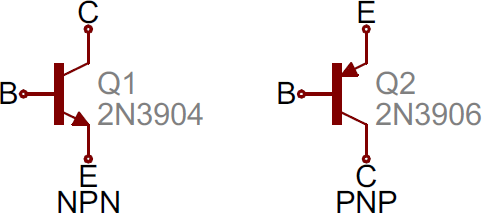
| BJT | Base, collector and emitter; an arrow identifies the emitter | A bipolar transistor used for switching or amplification | NPN/PNP type and actual B/C/E pinout |
| MOSFET | Gate separated from the channel; drain/source and sometimes body-diode details | A field-effect transistor controlled by gate-to-source conditions | N/P channel, operating mode and exact pinout |
| Operational amplifier | Triangle with separate + and − signal inputs | Responds to the difference between its two inputs | Supply pins, input range, feedback and output limits |
| Logic inverter | Triangle with a small output bubble in a common distinctive-shape notation | Produces the opposite valid logic state | Supply, logic thresholds and output capability |
| Connector | Numbered terminals grouped in a boundary | An interface to another board, cable or external item | Pin numbers, mating view and orientation |
A component’s role comes from its connections as well as its name. A resistor might limit current, set gain or pull a signal toward a supply. Recognizing “resistor” does not tell you which job it performs. Similarly, two coil symbols do not by themselves establish safety isolation: the actual transformer specification and circuit design decide that.
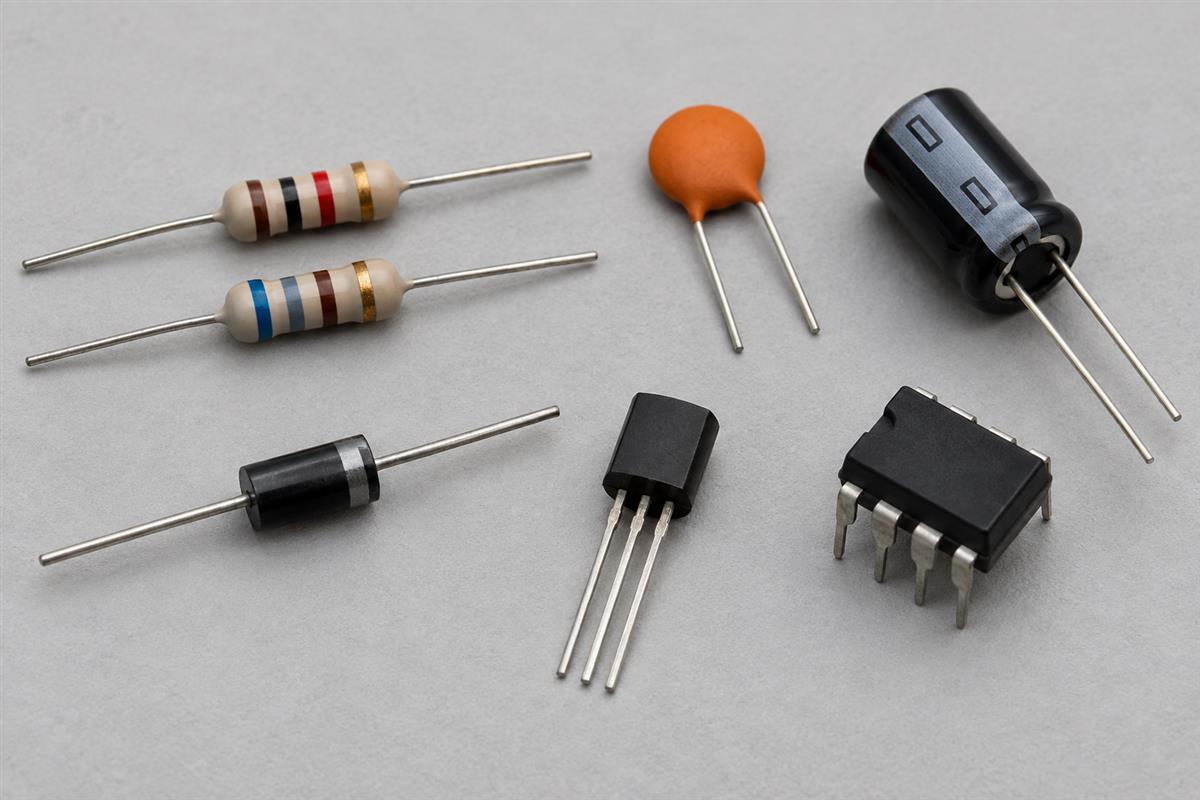
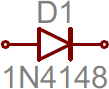
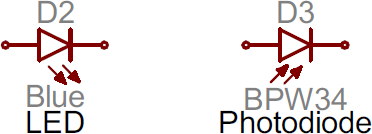
Compare the marks directly: these original SparkFun drawings show the diode and cathode bar, LED versus photodiode arrows, NPN versus PNP emitter arrows, and common logic-gate shapes. Use the labeled terminals in those references, then check the actual part’s datasheet. The photographs in this article illustrate physical components; they do not define standardized symbol geometry.
Do not treat every transistor as the same device
A MOSFET is not simply an improved BJT with interchangeable terminals. BJTs use base, collector and emitter terminology; MOSFETs use gate, drain and source. ROHM’s transistor classification guide distinguishes bipolar and field-effect devices and also shows that a package can contain more than one element. Identify the device family and part number before interpreting the symbol’s behavior.
For a MOSFET, gate voltage must be considered relative to its source. A threshold specification is not automatically the voltage needed for the desired low on-resistance. This reference is for recognition; use the selected device’s operating specifications for design decisions.
Polarity and Direction Marks You Must Not Confuse
Small marks can change the meaning of a symbol. Identify what the mark belongs to before calling it a current arrow, positive terminal or input.
| Mark | How to interpret it | Common wrong conclusion |
|---|---|---|
| Bar on a diode symbol | Identifies the cathode side of the symbol | Assuming the component’s package mark is always identical across all part families |
| Arrows beside an LED | Light emission away from the device | Treating those arrows as the direction of current through the leads |
| Arrow on a BJT emitter | Distinguishes NPN and PNP orientation; it points out for NPN and in for PNP in the usual symbol | Using symbol position to guess physical emitter lead location |
| Plus sign at a polarized capacitor | The specified positive terminal | Assuming every capacitor has polarity or that a curved line alone is enough in every drawing convention |
| + and − at op-amp inputs | Non-inverting and inverting signal inputs | Connecting the supply directly to those inputs because of the signs |
| Small circle at a logic terminal | Inversion or active-low meaning within that logic notation | Confusing it with a wire junction dot |
| Dot by a transformer winding | Relative winding polarity convention | Calling it a wire connection between isolated windings |
Symbol polarity and package marking are related through the datasheet, not by a universal visual rule. If a board marking, BOM and package indicator disagree, stop and resolve the conflict. Do not rotate a part merely because one orientation “looks right.”
A drawing can also rotate or mirror a symbol for readability. The pin identifiers and electrical meaning must still agree with the part. In a PDF, zoom in before deciding whether a tiny mark is a filled junction, inversion bubble or polarity dot.
Wires, Junctions and Ground Symbols
Connection symbols tell you which terminals belong to the same electrical node. They are not decorative lines, and their meaning is different from the physical path of copper on a PCB.
- Filled junction dot: normally marks connected wire segments at an intersection.
- Crossing without a junction: commonly indicates no connection in modern schematics. Check the legend for older drawings and verify ambiguous intersections in the source design.
- Net label: can connect points without a visible wire, subject to the EDA tool’s label scope.
- No-connect mark on a pin: indicates an intentionally unused pin in the design tool; it is not a junction.
- Ground or return symbol: identifies a reference or return network, not automatically protective earth.
For instance, two points marked GND may belong to a common return in one drawing, while AGND and chassis are deliberately separated in another. Do not connect them just because each looks like a kind of ground. Read the net names and documented grounding arrangement.
The KiCad schematic manual documents explicit junctions and local, global and hierarchical label scopes. When source files are available, highlighting the net is a stronger check than judging a crowded screenshot. This is particularly useful when a line almost touches a pin but is not actually connected.
Match Symbol Pins to the Actual Component
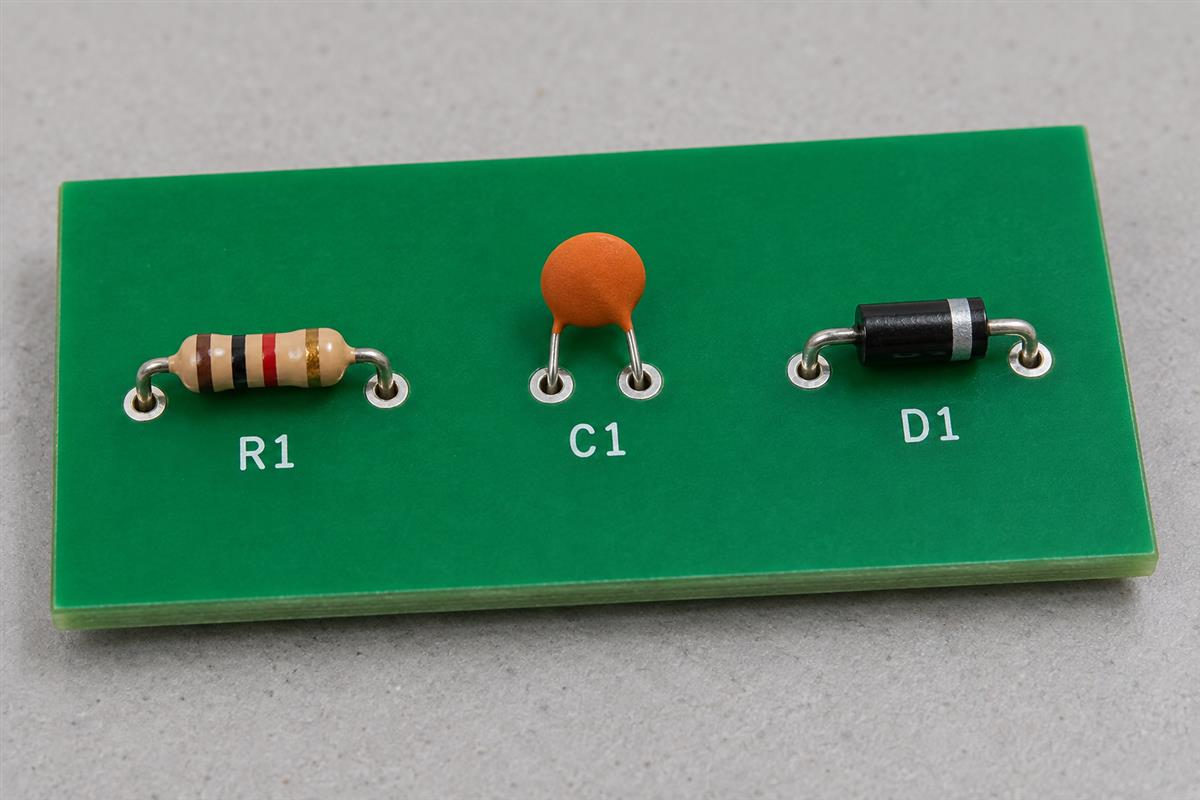
Match the symbol pin number to the datasheet terminal and the footprint pad number. Do not match by left/right position on the drawing. A symbol can group pins by function even when the physical package arranges them differently.
Worked check: a single inverter in a five-pin package
Texas Instruments’ SN74LVC1G04 datasheet gives the following mapping for its DBV, DCK and DRL packages. Other listed packages must be checked separately.
| Pin number | Name | Meaning in this example |
|---|---|---|
| 1 | NC | No internal connection as specified for these packages |
| 2 | A | Signal input |
| 3 | GND | Ground terminal |
| 4 | Y | Signal output |
| 5 | VCC | Supply terminal |
If the schematic draws A on the left and Y on the right, that arrangement helps explain signal direction. It does not locate the leads on the physical device. The pin-number table and package drawing establish that mapping. The same datasheet lists a different VCC terminal number for its six-pin DSF/DRY variants, which is why a familiar part name alone is not enough.
For the logic function, a valid low at A produces a high at Y, and a valid high produces a low, under the specified operating conditions. “High” does not mean an unlimited ideal voltage source: supply range, thresholds, loading and timing still come from the datasheet.
Save this symbol-to-board checklist
- Find the exact manufacturer part number and package suffix in the BOM.
- Open the matching datasheet revision and pin-function table.
- Compare every symbol pin number and name, including supply, enable and exposed-pad connections where applicable.
- Check all units of a multi-unit symbol; a separate power unit may contain essential supply pins.
- Compare the assigned footprint pad numbers and the package drawing’s viewing direction.
- Run the design tool’s electrical checks, then review any exceptions. A clean check does not prove that a manually entered library pinout is correct.
This step connects symbol reading to PCB design and physical layout. For a design or assembly review, send PCBtry the schematic, BOM, assigned footprints, fabrication data and the specific pin or polarity questions through the contact page. Identify unresolved library assumptions before releasing a production revision.
Circuit Symbol Questions
Why can the same component have two different symbols?
Drawings and libraries may follow different conventions. A resistor is a familiar example: zigzag and rectangular forms both occur. Check the project’s legend and accompanying text rather than rejecting a component solely because the shape differs from your first tutorial.
Does a schematic show the actual size of a component?
No. A symbol communicates function and connections. The footprint, package drawing and mechanical model describe physical geometry. A large IC symbol can represent a tiny package, and a small resistor symbol can represent a physically large power resistor.
Is a triangle always an operational amplifier?
No. Look for the inputs, output, markings and device name. An op-amp commonly has separate inverting and non-inverting inputs. A digital inverter commonly has an inversion bubble. Other amplifier and buffer functions also use triangular shapes.
Can I identify a replacement from the symbol alone?
Usually not. The symbol identifies a category or function, while replacement suitability depends on part number, package, ratings and circuit requirements. Use the BOM and datasheet; do not substitute two parts simply because their schematic outlines match.
Does GND always mean a connection to earth?
No. Circuit ground can be a local voltage reference or return. Protective earth and chassis connections serve particular purposes and may use different symbols. Follow the documented system arrangement, especially in mains-connected equipment.
What does an NC label mean?
Its meaning must be checked in context. An IC datasheet may use NC for a terminal with no internal connection; a switch drawing may use NC for normally closed. Do not treat a pin marked “do not use” as interchangeable with either of those meanings.
Do R1 and R2 need to appear in numerical order?
No. Reference designators identify components, not the direction of current or mandatory reading order. Annotation may change as the design evolves. Follow connections and labels, then use the reference to find the corresponding BOM and PCB item.
Can I safely probe a board once I recognize its symbols?
Recognition alone is not electrical safety training. Identify voltage, stored energy and other hazards before testing. Powered mains or high-energy work requires suitable expertise, instruments and procedures; practice schematic interpretation without energizing unfamiliar hardware.




0 Comments