




What is copper thieving, and why are the dots there?
PCB copper thieving is the deliberate addition of non-circuit copper features to help control fabrication. The small dots or squares you see in otherwise empty areas are not necessarily missing components or test points. Their purpose may be to improve the distribution of copper during manufacturing, rather than carry a signal in the finished product.
For conventional outer-layer pattern plating, the amount and arrangement of exposed copper influence how plating current is distributed. Sparse and dense areas can build copper differently. Adding suitable features is one way the fabricator can manage that variation. In this process, the features share the conductive copper layer during plating; later etching removes the unwanted copper between them, leaving separate islands. Altium’s thieving explanation describes this sequence and the fabricator’s role in selecting the pattern.
That distinction answers a common question: how could disconnected dots participate in electroplating? They were not isolated in the same way at the relevant manufacturing stage. Do not infer the entire process from a photograph of the finished board.
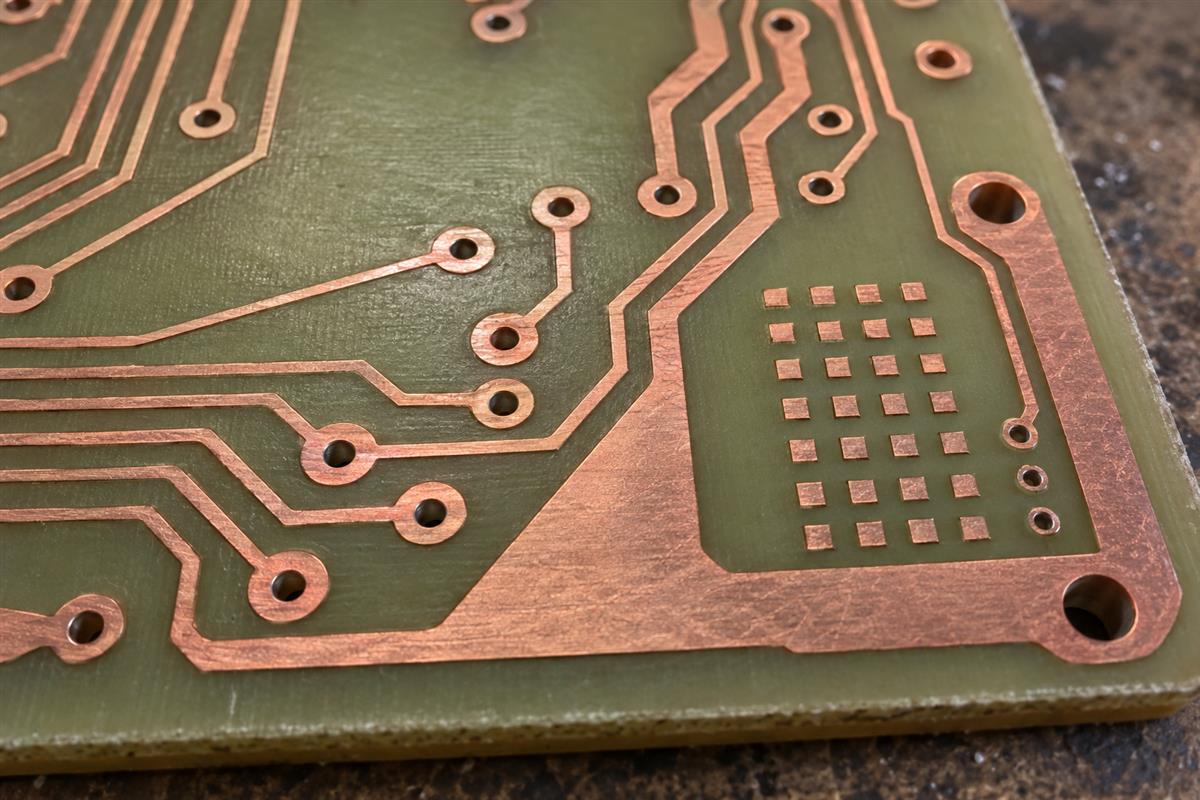
PCB Prime’s manufacturing guidance also discusses copper distribution in relation to etching and lamination. Suppliers may therefore use “thieving” and “copper balancing” with somewhat different scopes. Ask which layer, process and risk the proposed addition addresses. A plating adjustment on an outer layer is not the same decision as balancing copper across a multilayer stack.
How is thieving different from a ground pour?
Thieving serves a manufacturing purpose; a ground pour is copper intentionally assigned to the circuit’s ground network. They may both occupy a large area, but their electrical roles and approval requirements are different. An isolated square should not be treated as a ground connection simply because it is made of copper.
| Feature | Primary question | What to verify |
|---|---|---|
| Manufacturing thieving | Does the added pattern help the stated fabrication objective? | Allowed area, layer, isolation and approved production artwork |
| Ground or power pour | Does this connected copper perform its intended circuit function? | Net assignment, connection geometry and electrical requirements |
| Broader copper balancing | Is copper distribution suitable for the selected stack and process? | Layer construction, manufacturing review and applicable dimensional requirements |
The Infineon/Cypress PowerPSoC hardware guide, section 3.6.4, warns that allowing fabrication additions does not itself guarantee the intended electrical performance. Its advice is application-specific, but the useful general lesson is to retain design control. Do not let “manufacturing improvement” become permission to change any copper anywhere.
Nor should you connect every island to ground as a reflex. That changes the design rather than merely approving a process aid. Have the responsible designer decide whether the proposed copper belongs to a net, must remain isolated, or must be absent. Record that decision in the released files.
Where must added copper be controlled?
Control added copper wherever the design relies on a defined copper-free region or electromagnetic geometry. The visible top layer is not enough: the restriction may apply to several layers, an antenna region, an isolation boundary or a sensitive route beneath the surface.
Eurocircuits explains an important handoff limitation: CAD keepouts are design-time constraints and are not normally conveyed to the manufacturer directly. The factory may see an empty region without seeing why it must stay empty. Communicate the restriction explicitly in the fabrication package and confirm how the recipient will apply it.
| Region to identify | Information the fabricator needs | Approval boundary |
|---|---|---|
| Antenna or RF-sensitive area | Defined boundary, affected layers and released antenna requirements | No additions that conflict with the design owner’s restrictions |
| Controlled-impedance routing | Stackup, relevant routes and permitted nearby geometry | Review the proposed geometry, including adjacent layers |
| Electrical isolation region | Design-controlled copper exclusions and applicable product requirements | Refer changes to the responsible electrical/safety reviewer |
| Board edges, slots and mechanical interfaces | Profile and copper-clearance requirements for the actual construction | Check against the released drawing, not an assumed generic spacing |
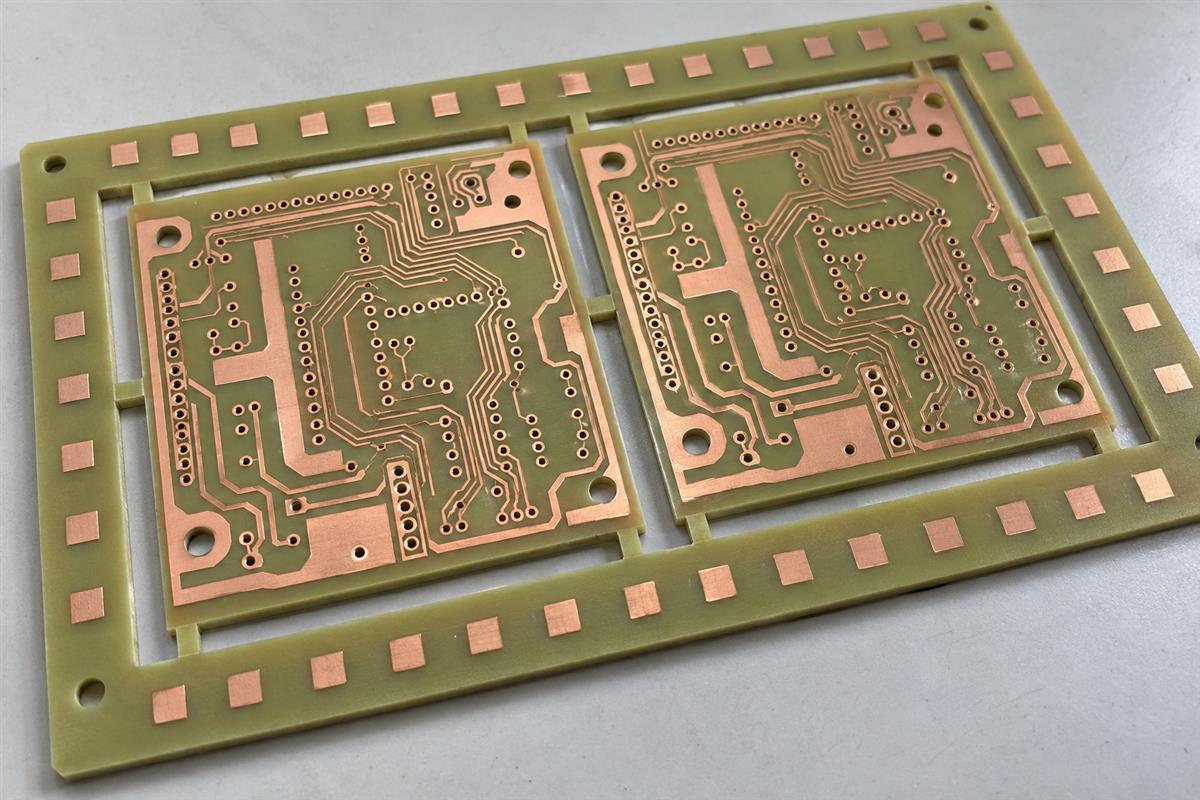
| Panel rails outside the shipped board | Panel outline, breakaway boundary and tooling restrictions | Approve as panel features; do not confuse them with retained board copper |
Altium specifically cautions that thieving above buried traces can affect their impedance. “No net” is a connectivity description, not proof that nearby electric fields are unaffected. There is no single clearance in this article that can approve every stackup, frequency or isolation requirement.
A component courtyard is not automatically a copper keepout either. One controls component placement; the other controls conductive geometry. If a drawing just says “keep clear,” clarify what is excluded and on which layers before production is released.
How should you review a CAM thieving proposal?
Review the proposed additions against an identified design revision, with the before-and-after copper visible on the relevant layers. CAM means computer-aided manufacturing: this is the production-data preparation stage, not an opportunity to silently redesign the circuit.
- Establish the baseline. Provide the released fabrication data, stackup, board profile and notes. Identify the exact revision in the supplier’s response. Reviewing yesterday’s output against today’s drawing can produce an approval that covers neither build.
- Ask for the manufacturing reason. Is the concern local plating distribution, panel layout or another copper-balance issue? Ask the fabricator to identify the affected region and the proposed control. “Standard process” alone does not explain a sensitive change.
- Map permissions before adding shapes. Mark permitted areas and prohibited regions by layer. Distinguish copper remaining on the finished board from copper on discarded panel material. Resolve unclear boundaries now; uncertainty at this step should hold the affected CAM change.
- Compare the production artwork. Request a layer overlay or change view. Check that additions remain inside approved areas and that functional traces, pads, holes and specified exclusions have not changed unintentionally. Review sensitive adjacent layers as well.
- Agree how success will be checked. Define the needed manufacturing and electrical evidence for the identified risk. A picture can document placement of copper, but it cannot establish plated-hole wall thickness or application performance.
- Release a traceable decision. Save the approved production-data revision, exceptions and approver. State which changes require another review on repeat orders or a new panel configuration.
If an addition is not acceptable, explain the restriction and ask the fabricator for an alternative process or panel strategy. A blanket prohibition may remove a useful manufacturing option; a blanket permission can hide a design change. The useful answer is a bounded agreement that both sides can verify.
These checks sit within the wider PCB DFM and DFA review. Thieving approval does not replace the rest of the fabrication release.
What evidence should accompany production approval?
The evidence should match the claim: artwork proves what was added, measurement checks the manufactured feature, and electrical validation addresses the relevant circuit behavior. Do not substitute one for another.
Elsyca’s PCBBalance documentation describes analysis of board and panel layouts, predicted thickness distributions and output of balancing features. Such analysis can help explain a proposal. It is not evidence that your supplier used that software, nor is a predicted result a measurement of the delivered lot.
| Claim being approved | Useful evidence | What it does not prove |
|---|---|---|
| Additions stay in permitted regions | Revision-controlled layer comparison and exclusion map | Actual plating thickness |
| Manufacturing requirements were met | Agreed inspection results tied to the lot and sample locations | Performance of every sensitive circuit |
| A sensitive geometry remains acceptable | Design review and appropriate analysis or test | Unrelated areas not included in that review |
| The next order will use the approved pattern | Archived production revision and change-control instruction | That future changes need no review |
A simple hypothetical area calculation shows the limit of a visual density check. A 20 mm by 20 mm region has an area of 400 mm². If existing copper covers 100 mm², its coverage is 25%. Adding 100 isolated squares, each 0.5 mm by 0.5 mm, adds 25 mm², assuming none overlap existing copper. The resulting coverage is 125/400 = 31.25%.
That calculation does not establish an acceptable density target, a thieving pitch or a plating-thickness improvement. It says nothing about local current distribution, hole geometry or the plating setup. Use area figures to describe a proposed change, not to certify it. Likewise, a neat-looking grid is not a manufacturing test report.
Copper thieving questions
Are the small dots test pads?
Not necessarily. Manufacturing copper can resemble test features but have no test function. Check the released artwork and net information before assigning a purpose. Appearance alone cannot tell you whether a feature is connected, isolated or intended for a probe.
Does every PCB need thieving?
No universal requirement follows from the term. Ask the fabricator whether the actual design and process need it, where it would be added and what problem it addresses. Neither a completely blank area nor a dense layout is enough to approve a pattern by itself.
Should I copy the dots from another board?
No. A pattern chosen for another panel, copper distribution or fabrication route is not a validated recipe for your design. Start with your constraints and ask the fabricator to propose a suitable arrangement within them.
Does the same explanation apply to inner layers?
In conventional multilayer fabrication, inner layers are patterned before lamination and do not undergo the same outer-layer pattern-plating sequence. Inner-layer copper balancing can have other objectives. Identify the actual process, especially for sequentially built structures, before generalizing.
Can solder mask make a prohibited copper addition acceptable?
Do not assume so. Covering copper does not remove the conductive feature or establish that the design’s electrical restrictions are satisfied. Obtain design approval against the applicable requirements rather than treating mask as automatic permission.
Can thieving guarantee a lower price?
No. A manufacturer may use it to improve process control, but the quote depends on the complete build. Ask about the specific cost or yield concern and the evidence for the proposed remedy; do not assume a fixed saving from the presence of dots.
What if the delivered board has unexpected copper?
Compare the delivered board and approved production revision before using the lot. Ask the supplier to identify the change and authorization. Where the addition affects a restricted region, hold acceptance for engineering review rather than deciding from a photograph that it is harmless.
What should be sent with a thieving review request?
Send the current fabrication files, layer stack, board and panel drawings, copper-exclusion map, sensitive-route requirements and the approval owner. State whether additions are allowed on the finished board, panel rails, both or neither. Ask for exceptions to be resolved before release.
For a PCB manufacturing review, use the PCBtry contact page to send that package and request a marked-up CAM proposal. Agree where copper may be added and what evidence is needed before authorizing the production data.

0 Comments