




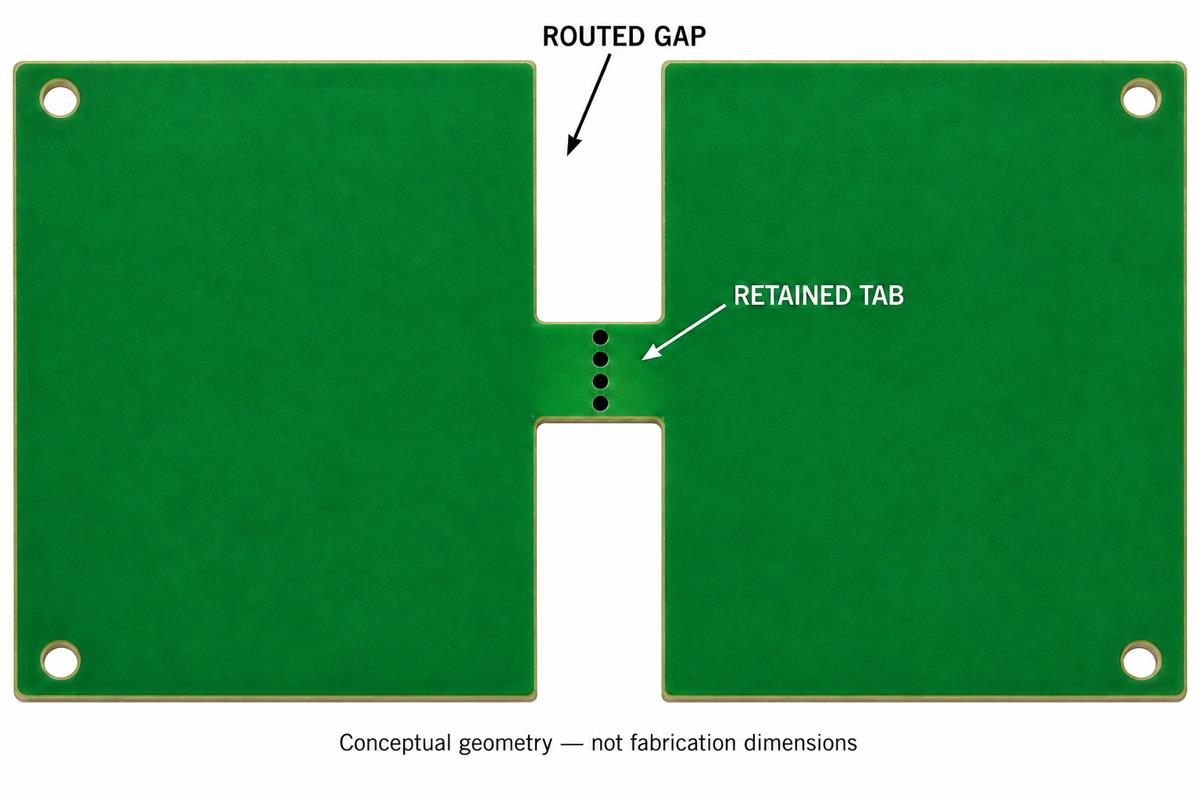
PCB mouse bites are rows of small holes that weaken a breakaway tab so a board can be separated from its surrounding material. The tab is the remaining bridge; the holes are only one part of its geometry. A few holes along a long, otherwise uncut edge do not necessarily create a practical breakaway connection. Before ordering, review the routed gaps, bridge width, hole pattern, nearby features and required edge after separation together.
The most useful question is not “Which hole diameter should I copy?” It is “Will this exact panel stay supported during processing and separate in the agreed way without violating the finished-board requirements?” The drawing and a representative trial should answer that question before a production release.
What Are PCB Mouse Bites?
Mouse bites make a deliberately weakened connection in a retained tab. They are not the same thing as a plated electrical via, a tooling hole or a V-score groove. In its bridge guidance, AISLER explains that bridges are areas left uncut while the surrounding contour is milled. Its placement rules illustrate one manufacturer’s process, not a universal drawing standard.
| Feature | Meaning | Review question |
|---|---|---|
| Routed gap | Material removed around the board | Does the gap actually isolate the intended bridge? |
| Tab or bridge | Material intentionally left joining two regions | Is its width dimensioned separately? |
| Perforation row | Holes weakening a selected section | Are diameter, pitch and position unambiguous? |
| Finished outline | The required edge of the delivered board | How much protrusion or recess is acceptable here? |
Do not substitute a familiar hole symbol for an agreed manufacturing feature. A locating hole has a different purpose; see the PCB tooling-hole guide when the drawing also contains fixture references. Label the breakaway feature and its intended processing explicitly.
Why Does a Perforated Board Refuse to Separate?
First inspect the material left between the boards, not just the drill count. In a Reddit design question, a maker had followed several dimension suggestions but still could not separate the board. The discussion exposed confusion between a narrow bridge and a much longer connected edge. That is a useful diagnostic question, not proof of the exact fault in every difficult panel.
Draw the retained material as a solid shape. If most of the shared edge is still present, adding isolated clusters of holes does not turn the whole edge into a small tab. Next, distinguish centre-to-centre pitch from the clear material between adjacent holes.
Geometry example, not a recommended design: for five equal holes of diameter 0.60 mm on 1.00 mm centre pitch, the clear gap between adjacent holes is 1.00 – 0.60 = 0.40 mm. The outside-to-outside span of the row is (5 – 1) x 1.00 + 0.60 = 4.60 mm. That span is not automatically the bridge width: any material outside the end holes also matters. These numbers explain a drawing; they do not predict breaking force.
- Find the routed openings. Confirm which material is removed and which remains in the fabrication output.
- Measure the bridge independently. Do not infer its width from the number of holes.
- Read diameter and pitch labels. Ask for clarification if a spacing dimension could mean either centre pitch or edge gap.
- Check the actual build. Thickness, material, copper crossing the connection and access for separation belong in the review.
- Stop if the sample needs unexpected force. Compare it with the approved geometry and removal method rather than increasing the bend until something gives.
OSH Park’s ProtoSnap guidance similarly treats tab width and board arrangement as design-dependent, and warns about traces pulling up in intentionally connected breakaway circuits. Such circuits need a separate electrical and mechanical review; do not treat them as ordinary sacrificial panel tabs.
Where Should Breakaway Tabs Go?
Choose locations after identifying the edges and components that must be protected. Then have the manufacturer and assembler confirm that the proposed arrangement also provides adequate support. A convenient location in CAD may be a poor location for final fit or tool access.
| Location | Concern | Decision to document |
|---|---|---|
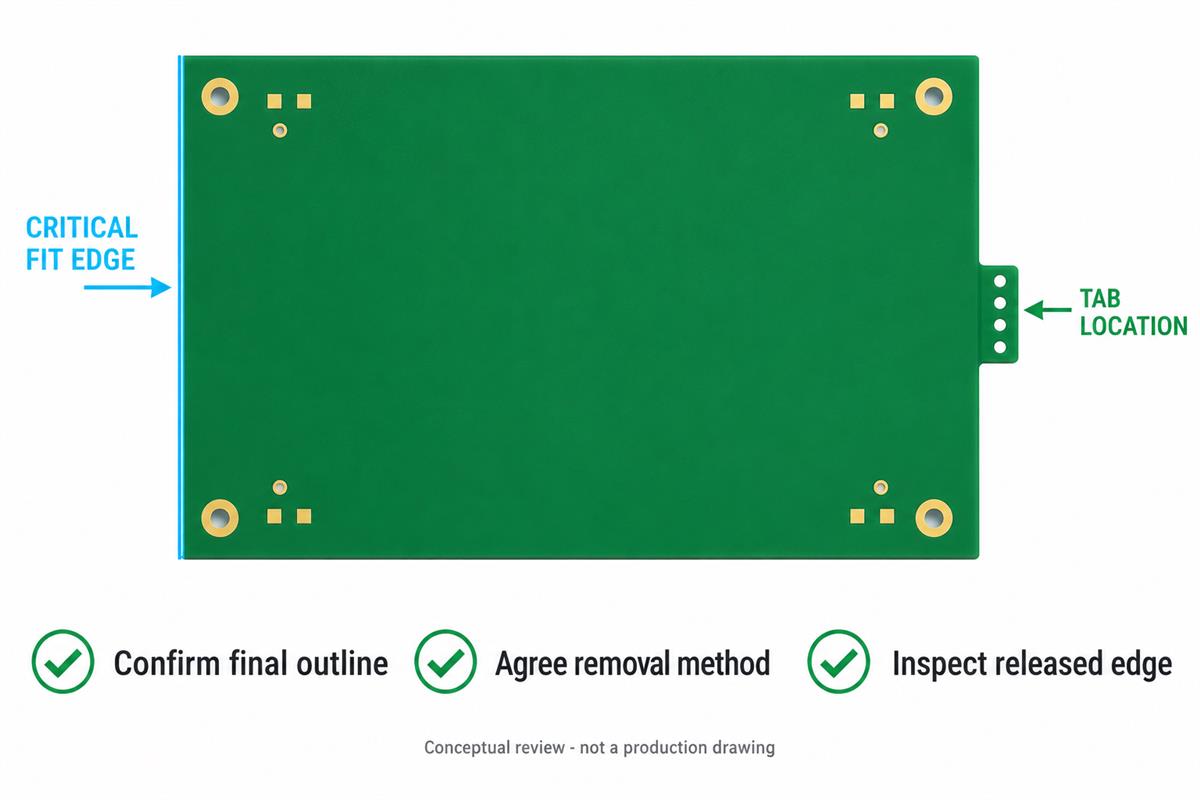
| Enclosure mating edge | A residual nub can interfere with fit | Exclude tabs here or specify an agreed finishing operation and final dimension |
| Visible front-panel edge | The break surface may not meet the appearance requirement | Define the finish with a drawing or approved sample |
| Overhanging connector or nearby part | The component can obstruct the separation tool | Review the assembled geometry, not only the bare-board outline |
| Narrow neck or cutout | Local support and access may be limited | Request a panel and removal-method review before approving the tab |
AISLER explicitly identifies critical-fit segments, overhanging parts and narrow cutouts among the reasons to review default bridge positions. Use that principle to mark constraints, but obtain the actual geometry from the supplier handling your build. Do not silently apply another factory’s minimum tab count or marker-layer convention.
How Should Removal and Edge Finish Be Approved?
Approve the separation method and the resulting edge as two distinct requirements. A board can come free without meeting its enclosure dimension or cosmetic requirement. A front-panel maker’s Reddit question illustrates this difference: rough remnants were tolerable on a hidden circuit board but undesirable on the visible panel.
For a visible or precision-fit edge, discuss finishing before ordering. Do not plan production around an unspecified promise to “clean it up later.” Where a machined profile is required, review the PCB routing process and inspection checks with the supplier.
- Specify the delivery state. State whether you need an intact panel, individual bare boards or separated assemblies, and who owns separation.
- Agree the support and tool access. The removal plan must account for the actual board and fitted parts. This article is not authorization to twist an assembled board by hand.
- Trial representative geometry. Use the intended thickness, tab pattern and relevant assembly condition. Record the method and any unexpected difficulty.
- Inspect the released edge. Compare dimensions and remnants against the drawing; investigate cracks, lifted copper or damage rather than dismissing them as normal tab marks.
- Check the real interface. For an enclosure fit, use the specified dimensional checks or an agreed mating gauge. Keep the approved result with the revision.
Example: a board may fit its slot everywhere except at one remaining tab nub. Moving the tab away from that mating edge, or adding an agreed finishing operation, addresses a different problem from making the perforations easier to break. Mark that edge as critical before the panel is approved.
Mouse-Bite Drawing Review Checklist
Use this worksheet at drawing release. Each item should have an answer or a named owner; an attractive panel preview is not a substitute for the missing detail.
| Check | Evidence to keep | Hold release when |
|---|---|---|
| Bridge geometry | Dimensioned retained tabs and routed gaps | Only the drill pattern is shown |
| Hole definition | Diameter, pitch, position and manufacturing designation | Pitch and edge spacing can be confused |
| Protected areas | Marked mating edges, copper constraints and component access | A tab conflicts with a critical feature |
| Separation ownership | Delivery state, responsible party and agreed method | Each party expects the other to remove tabs |
| Acceptance | Finished-edge limits, inspection method and sample approval | The only criterion is “looks smooth” |
Send the fabrication package and drill data together with board thickness, the marked panel drawing, assembly outline where relevant, quantity and required delivery state. Ask the supplier to identify any changed tab locations before release. Save the approved drawing alongside the source revision so a reorder does not fall back to an earlier arrangement.
PCB Mouse Bites Questions
Are mouse bites the same as vias?
No. Their purpose is mechanical separation. A via is an electrical interlayer connection. Specify the intended fabrication feature instead of relying on visual similarity in the CAD view.
Is hole pitch the same as the gap between holes?
No. For equal circular holes in a straight row, the clear gap is centre pitch minus diameter. State which dimension you mean.
Can I copy a standard footprint without checking it?
No. Check the retained bridge, routed gaps, thickness, surrounding features and the supplier’s process. A footprint does not approve the panel or its removal method.
Will more holes always make a better tab?
No. The pattern must be evaluated as part of the complete bridge. Processing support and controlled separation are both requirements, not interchangeable goals.
Must I draw my own tabs for an individual board order?
Not necessarily. Ask who prepares the production panel and how critical edges should be marked. Supplier submission conventions differ.
Can a tab remain on an enclosure mating edge?
Only if the delivered geometry meets the agreed fit requirement. Specify any allowed remnant and finishing, or request another location.
Can a breakaway section carry electrical traces?
Some deliberately designed circuits do, but trace tearing and post-separation connectivity need separate review. Do not route ordinary required connections across a sacrificial tab by accident.
What should I do if a received panel will not separate?
Stop and send the supplier photos, the approved drawing, thickness and the intended removal method. Confirm whether the delivered geometry matches the approved revision before attempting further separation.
Preparing a panel for quotation? Contact PCBtry with the files and marked critical edges. Request confirmation of tab geometry, delivery state, separation responsibility and final-edge acceptance before approving production.



0 Comments