




A PCB board supports electronic components and connects them through patterned copper paths. Those connections carry power and signals between the parts. The components perform jobs such as limiting current, sensing temperature, switching a load or processing data; the PCB makes their intended connections physically repeatable.
To understand what a PCB board does, follow one small circuit rather than memorizing a list of board types. A power source, resistor and LED are enough to show why both the components and the copper connections matter.
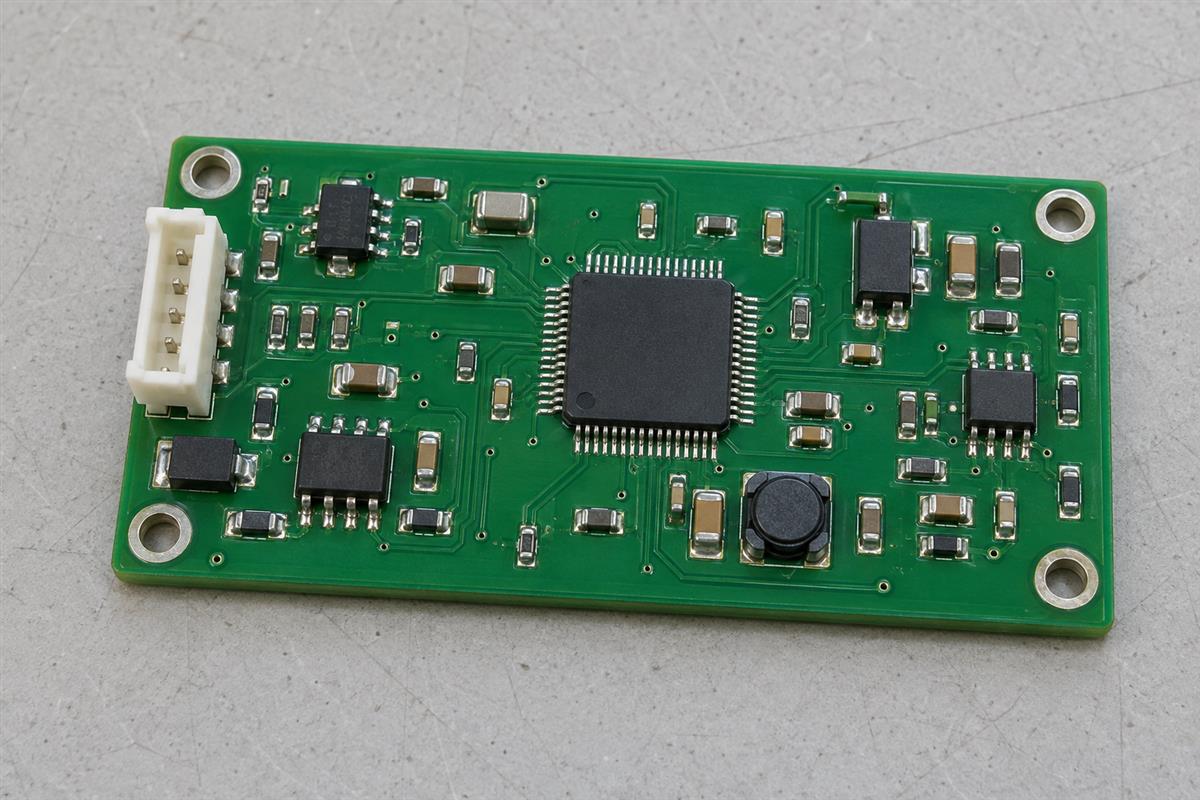
What the board does, and what the components do
The board provides the physical connection system; the components use those connections to perform the circuit’s function. A bare PCB is not automatically a working controller, charger or computer. In ordinary usage, people often call the populated assembly a “circuit board,” which can hide this distinction.
| Item | Its job in a simple indicator circuit | What it does not do by itself |
|---|---|---|
| Insulating board material | Supports the copper pattern and keeps intended conductors separated | Supply energy or decide when the LED turns on |
| Copper traces and pads | Connect the supply, resistor and LED according to the design | Replace the deliberately chosen current-limiting resistor |
| Solder joints | Make electrical and mechanical connections between component terminals and pads | Correct a wrongly routed circuit or a wrong component |
| Resistor | Limits current in the series LED circuit | Generate the supply voltage |
| LED | Emits light when appropriately forward-biased and operated within its ratings | Set a safe current without a suitable limiting arrangement |
| Power source | Provides energy and a voltage difference across the complete circuit | Make a broken connection conduct normally |
On a more complex assembly, a microcontroller runs firmware and a voltage regulator controls a supply rail. Those functions belong to the devices and circuit design, not to the board’s green coating. However, the board is not electrically irrelevant: its conductor geometry, insulation and physical arrangement affect how well the circuit works.
Follow the current through a simple LED circuit
In this example, copper paths connect a low-voltage source, a series resistor and an LED into one closed loop. The LED lights only when the connections, polarity, supply and component values permit the intended current.
This is an explanatory low-voltage example, not instructions for opening an appliance. Do not probe or modify mains-powered equipment, large battery systems or unknown boards based on this example. Disconnecting power does not by itself establish that stored energy has been removed.
Start with the connection sequence
- Supply positive to the resistor. A connector pad receives the supply connection. A copper trace connects that pad to one resistor terminal through its solder joint.
- Through the resistor to the LED anode. The resistor’s other terminal connects through a second copper path to the LED’s anode, its positive-side terminal in this circuit.
- Through the LED to its cathode. The correctly oriented LED conducts under the intended forward-bias conditions and converts some electrical energy into light.
- Back to supply negative. A return trace connects the cathode to the source’s negative terminal, completing the loop.
This follows conventional current from positive toward negative through the external circuit. Electron motion in metal is in the opposite direction. The distinction does not change which terminals must be connected. Current is not consumed by the LED: in this simple steady-state series circuit, the same current passes through the resistor and LED while energy is transferred and dissipated.
Here, the negative supply node may be labeled GND. That label denotes the circuit’s reference node; it does not necessarily mean a connection to protective earth. A connection to only one LED terminal is not a complete powered circuit.
A small numerical example
Assume a 5 V DC supply, an LED with approximately 2 V forward voltage at the intended operating current, and a 1,000-ohm series resistor. The approximate resistor voltage is 5 – 2 = 3 V. Using Ohm’s law:
I = (Vsupply – VLED) / R = (5 – 2) / 1,000 = 0.003 A = 3 mA.
The resistor dissipates approximately P = I2R = 0.009 W. These are assumed teaching values, not measurements or universal LED ratings. A real design must check supply tolerance, the LED datasheet, resistor tolerance and power derating. LED forward voltage varies with current and temperature, so the calculation is an approximation rather than an exact prediction.
Arduino’s Blink tutorial similarly explains why an external LED needs a suitable series resistor. Its particular board and resistor example should not be treated as a rule for every supply and LED.
Now change one connection
If the return trace is broken, the intended steady current stops and the LED remains off. If an unintended copper or solder connection bypasses the resistor, the intended current limit is lost and damage may result. If the LED is reversed, it will normally not light under the intended low-voltage conditions and its reverse-voltage rating still matters. These are different failures even though a user may describe each as “the board does not work.”
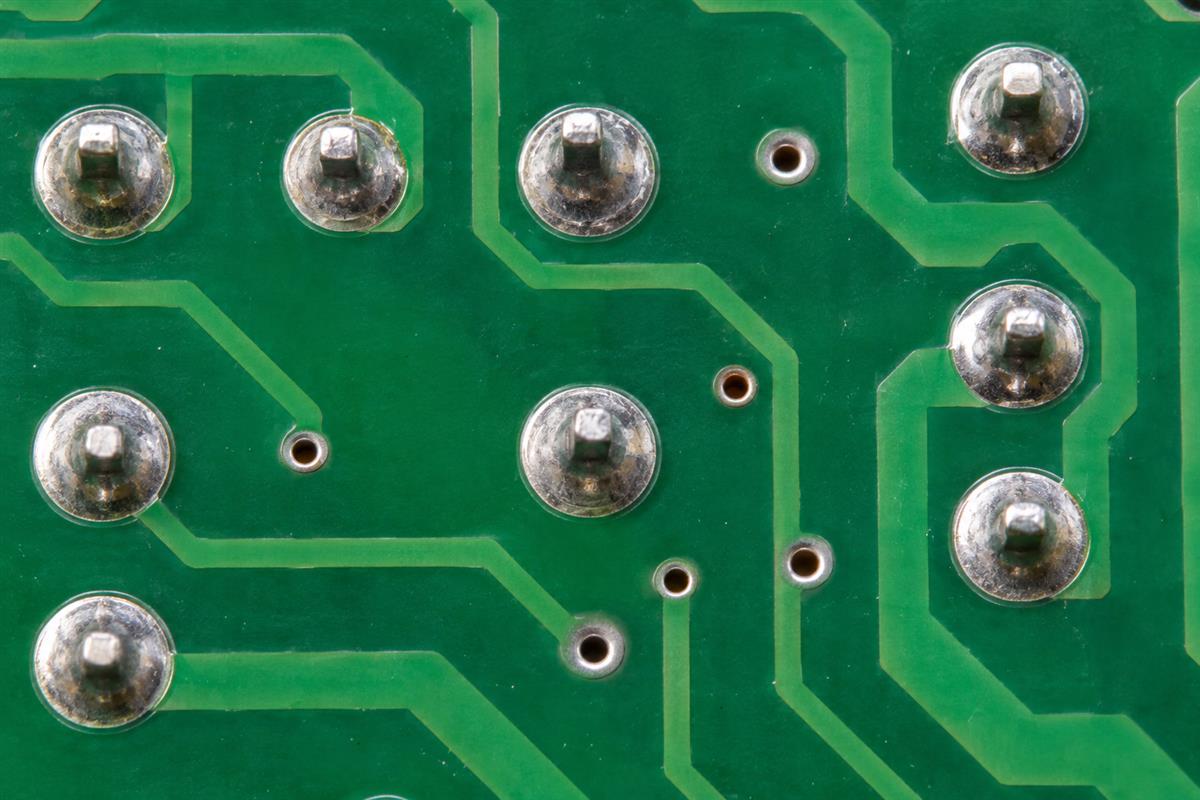
How traces, pads and vias make the connections
Traces are copper routes, pads are connection areas for terminals, and vias provide selected connections between copper layers. Together they implement the connections shown in the circuit diagram. The insulating material separates conductors that should not touch.
SparkFun’s PCB Basics illustrates these features and distinguishes the copper pattern, solder mask and component mounting. When looking at a physical board, remember that much of its copper may be hidden under solder mask or inside the board.
| Visible feature | What it can tell you | What appearance alone cannot prove |
|---|---|---|
| A line under the colored coating | It may follow a routed copper trace | Its complete destination, internal connections or electrical integrity |
| An exposed pad with solder | A component or connector terminal can attach there | That the joint is electrically sound or the correct part was installed |
| A small plated hole | It may connect selected copper layers | That every layer is connected to that hole |
| A large copper area | It may serve a power or reference-net function | That it is ground merely because it is large |
| A printed reference such as R1 or D1 | It helps match a physical part to design documents | The exact value, part number or present condition |
For the LED example, a route can run on one copper layer or change layers through a via without changing the intended series connection. The layout is different, but the required endpoints stay the same. An unplated mounting hole, in contrast, does not automatically provide an electrical connection.
Surface-mount and through-hole describe how components are installed. They are not substitutes for explaining how copper layers connect. A through-hole component lead can use a plated connection, while a surface-mounted component can connect to another layer through nearby vias.
The colored solder mask is a protective process coating with openings where connections are needed. It is not the conductor and should not be assumed to make an unknown circuit safe to touch. Silkscreen markings help people identify features but do not carry the circuit current.
Why use a PCB instead of loose wires?
A PCB makes the connection geometry and component locations repeatable in a compact assembly. Electronics can work without a custom PCB: a breadboard or point-to-point wiring can implement a circuit too. The advantage is controlled physical construction, not making electricity possible for the first time.
Consider building ten copies of the indicator circuit. With loose wires, each copy can have different wire lengths, component positions and mechanical support. A PCB repeats the pad positions and copper paths from the same design data. That helps assembly and inspection, although wrong design data can also repeat the same mistake ten times.
Mechanical support matters when someone presses a switch or inserts a connector. Solder joints should not automatically be expected to absorb every external load. Mounting features, component supports and the enclosure can share that responsibility.
For faster signals, sensitive analog circuits or higher currents, route geometry has additional consequences. Copper has resistance, inductance and capacitance associated with its construction and surroundings. Layout can influence voltage drop, noise and heat, even when the schematic connections look correct. More copper layers or a different board color do not automatically fix those problems.
The board can also help spread heat through its copper and other materials, but it does not guarantee cooling. Heat must still reach a suitable surrounding environment or cooling structure. The actual power dissipation and thermal path determine whether a design is acceptable.
What does a failed circuit board actually mean?
It describes an assembly-level symptom, not a confirmed faulty item. The problem may be in a copper connection, solder joint, component, power source, cable or firmware. Replacing the bare PCB is not automatically the correct repair.
| Observation | Possible explanation | Evidence needed before deciding |
|---|---|---|
| The indicator never lights | Missing supply, open connection, wrong polarity, wrong part or failed LED | Correct circuit documents and appropriate checks of supply, connectivity and components |
| A visible solder bridge | Potential unintended connection, or an intentional solder jumper | Comparison with the approved design, not appearance alone |
| Discoloration near a component | Possible heating or contamination; the cause is not established | Inspection and qualified diagnosis under the equipment’s service procedure |
| The bare PCB passes electrical test | Specified connections and isolation met that test’s criteria | Separate assembly, programming and functional evidence where required |
| The product works intermittently | Possible connection, supply, temperature, software or external-system issue | Reproducible operating conditions and measurements that isolate the cause |
An open circuit is an interruption in an intended conductive path. A short circuit is an unintended connection between points that should remain separated. Neither term tells you the cause by itself. A broken trace and a cracked solder joint can both interrupt a connection, but they involve different parts of the assembly.
For a service request, record the product and board revision, the expected behavior, the actual symptom and when it occurs. Include clear photographs and any test results obtained through the appropriate service procedure. A photograph is useful context, not proof that an unseen component or internal connection is healthy.
This explanation is not a live-board troubleshooting procedure. Unknown voltages, charged capacitors and high-energy supplies require suitable training and equipment. Do not use a continuity reading alone as proof that a powered product is safe or functional.
From understanding the board to ordering the right item
Specify whether you need the patterned bare PCB, a populated assembly or a replacement for an existing product. These are different deliverables. Knowing what the board does helps prevent ordering an empty board when the real requirement is a working module.
- Bare-board fabrication: provide the fabrication and drill files, drawing, quantity and required construction details. Agree the applicable inspection and electrical-test scope.
- PCB assembly: add the bill of materials, placement data, assembly drawing and any programming or functional-test requirements. Define what counts as a working assembly.
- Replacement or repair: identify the exact product, board part number and revision. Similar shape or connector placement does not establish compatibility; a custom fabrication supplier cannot infer a complete replacement design from a photograph.
For a new design, the next learning step is understanding how a schematic becomes a physical PCB layout. For a manufacturing enquiry, contact PCBtry with the relevant files and describe the intended circuit behavior, rather than only asking for “a PCB board.” Ask the team to confirm which design, fabrication, assembly and testing activities are included before proceeding.
Frequently asked questions
Does a PCB generate electricity?
No, not simply because it is a PCB. A power source supplies energy; copper routes distribute it. Components mounted on a board can convert or regulate electrical power, but those functions depend on the complete circuit.
Does every PCB need a chip?
No. A simple board can connect an LED, resistor and connector without an integrated circuit. Other boards carry many ICs. The required circuit function determines the components.
Can a circuit work without a PCB?
Yes. Suitable circuits can be built with breadboards, point-to-point wiring or other construction methods. A PCB provides a repeatable physical interconnection and mounting arrangement; it is not the only possible way to make connections.
Is the green material what carries current?
Usually the visible green surface is solder mask, not the conductor. Copper traces and planes underneath or inside the board carry current. Other solder-mask colors are possible without changing this basic distinction.
Does every hole connect the board’s layers?
No. Some holes are unplated mechanical features. Plated vias connect the layers selected by the design; they do not necessarily connect every layer they pass through.
Does the PCB itself store the program?
Firmware is normally stored in memory associated with components such as a microcontroller or flash device. The PCB connects and supports those devices. Calling an assembly a “programmed board” does not mean its copper pattern stores ordinary firmware.
Can I identify exactly what a board does from a photo?
A photograph may reveal connectors, component markings and likely functional areas, but hidden layers, unreadable part numbers and firmware limit the conclusion. Use the schematic, bill of materials and product documentation to confirm the function.
Does passing a bare-board test prove the finished product works?
No. Bare-board testing evaluates specified board connections and isolation. Correct components, assembly, programming and application-level behavior require their own verification where applicable.



0 Comments