




Introduction
“This PCB Layout Tutorial delves into one of the most critical and nuanced aspects of hardware design. A superior layout maximizes circuit performance, ensures signal integrity, reduces electromagnetic interference, and enhances production yield. Conversely, a poor layout, as often highlighted in foundational tutorials, can lead to complete project failure—even with a flawless schematic. This guide is designed to provide both principles and practical insights to master this essential skill.”

Core Principles and Preliminary Preparation
Defining objectives and preparing thoroughly is essential before placing any components.
Core Objectives
- Electrical Performance: Guarantee signal quality, power integrity, and system stability.
- Manufacturability (DFM): Adhere to PCB fabricator process capabilities to ensure high yield and low cost.
- Reliability: Account for thermal management and mechanical stress to ensure long-term product stability.
- Testability (DFT): Incorporate necessary test points to facilitate debugging and repair.
Pre-Layout Preparation
- Schematic Analysis:
- Collaborate with the schematic engineer to understand functional blocks (e.g., power supply, MCU, analog circuits, RF circuits).
- Identify critical signals (e.g., high-speed clocks, differential pairs, RF lines) and key components (e.g., BGA, QFN).
- Define Design Constraints:
- Electrical Rules: Trace width and spacing (based on current-carrying capacity and voltage).
- Physical Rules: Component clearance, board edge clearance.
- High-Speed Rules: Impedance control, length matching, topology structure.
- Obtain Mechanical Outline:
- Import the precise board outline, mounting holes, connector locations, keep-out areas, and other mechanical data. This is the foundational step for layout.
Detailed Layout Procedure
A structured workflow significantly enhances efficiency and layout quality.
Module Planning and Fixed Component Placement
- Place Fixed Components First: Prioritize components with mechanically dictated positions: connectors, switches, indicators, screw holes, etc.
- Functional Block Partitioning: Roughly delineate areas on the board for different circuit functions. Adhere to signal flow principles (e.g., left-to-right input/output) to avoid crossover and detours. Examples include:
- Power Section: Input connector -> Fuse -> Rectification -> Regulator -> Filter capacitors -> Output.
- MCU Section: Place the MCU centrally, with the crystal oscillator adjacent and decoupling capacitors close to its power pins.
- Analog and Digital Sections: Must be isolated! Prevent digital noise from interfering with sensitive analog signals.
Core Component Placement
- Position Core ICs: Place the MCU, FPGA, and other primary chips. Their location dictates the overall layout flow and should consider thermal management, peripheral connectivity, and signal flow.
- Place Supporting Components: Arrange peripheral components directly related to the core IC (e.g., crystals, oscillators, decoupling capacitors, resistors) following the “proximity principle.”
Detailed Component Placement
This is the most time-intensive phase, requiring a holistic consideration of routing, thermal management, and EMC.
- Prioritized Placement:
- High-Speed Circuits: Clocks, differential pairs (USB, HDMI, MIPI). Paths must be shortest and most direct.
- Analog Circuits: Op-amps, ADC/DAC, sensors. Layout should be compact and away from noise sources.
- High-Current Circuits: Switching regulators, motor drivers. Focus on path impedance and heat dissipation.
- Decoupling Capacitors: Must be placed as close as possible to the IC’s power pins! The current path should flow through the capacitor before reaching the IC, ensuring the shortest return path. Smaller value capacitors (e.g., 100nF) are often more critical for high-frequency noise than larger bulk capacitors (e.g., 10µF).
- Placement Techniques and Checks:
- Uniform Orientation: Orient polarized components (e.g., electrolytic capacitors, diodes) uniformly where possible to aid assembly and inspection.
- Adequate Spacing: Ensure sufficient clearance between components to meet soldering process requirements (especially for wave solder side).
- Thermal Management:
- Distribute high-power components (e.g., MOSFETs, inductors) to avoid localized hot spots.
- Provide thermal relief and add thermal vias if necessary.
- Neatness and Order: A tidy and organized layout, while secondary to electrical performance, reflects design rigor and aids manufacturability.
Key Circuit Layout Guidelines
Power Circuit Layout
- Goal: Low impedance, low ripple, high efficiency.
- Key Points:
- Minimize Loop Area: The power loop formed by the input capacitor, switch IC, inductor, and output capacitor must be minimized to reduce parasitic inductance and EMI radiation.
- LDO/Linear Regulators: Place input and output capacitors close to the regulator.
- Heat Dissipation: Use large copper pours or power planes for heat sinking, supplemented with thermal vias.
Analog Circuit Layout
- Goal: High precision, low noise.
- Key Points:
- Partitioning and Isolation: Clearly separate analog and digital sections. Use isolation gaps (moats) for physical separation if needed.
- Single-Point Grounding: Connect analog and digital grounds at a single point, typically near the power entry, to prevent digital noise from contaminating the analog ground plane.
- Guard Sensitive Nodes: Surround high-impedance nodes (e.g., op-amp inputs) with a guard ring (a grounded trace) for shielding.
High-Speed Digital Circuit Layout
- Goal: Ensure signal integrity (SI).
- Key Points:
- Impedance Control: Calculate controlled impedance for high-speed lines (e.g., clocks, DDR traces) and use an appropriate stack-up to achieve the target characteristic impedance.
- Length Matching: Apply matched length routing to bus signals (e.g., DDR data groups) and differential pairs to meet setup/hold timing requirements.
- Continuous Reference Plane: High-speed signal traces must have an uninterrupted reference plane (ground or power) directly underneath. Strictly avoid crossing plane splits.
Decoupling Capacitor Layout
- Rule: Capacitor -> Via -> IC power pin. Keep this path as short and wide as possible.
- Small Capacitors (0.1µF, 0.01µF): Responsible for filtering high-frequency noise. Must be placed immediately adjacent to the power pins.
- Large Capacitors (10µF): Handle low-frequency ripple and current transients. Can be placed slightly farther away.
Pre-Routing Layout Checklist
Before commencing trace routing, verify the following:
[1] Are all fixed-position components (connectors, mechanical parts) correctly placed?
[2] Is the placement of core ICs optimal, considering signal flow and thermal dissipation?
[3] Are the analog and digital sections clearly isolated?
[4] Is a decoupling capacitor located immediately next to each power pin of every IC?
[5] Is the crystal/oscillator placed close to the chip with the shortest possible path?
[6] Are high-power components spaced apart with adequate room for heat sinking?
[7] Is component orientation consistent (especially on the wave solder side)?
[8] Does component spacing meet PCB fabricator and assembly house requirements?
[9] Are any components placed in keep-out areas?
Summary
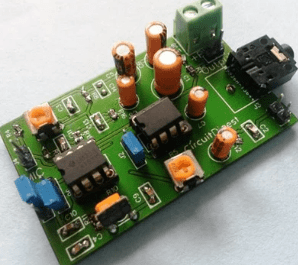
PCB layout is an exercise in trade-offs, finding the optimal balance between performance, cost, and time. There is no single “correct” answer. However, adhering to the principles and procedures outlined above will systematically avoid common pitfalls and significantly increase the success rate of your PCB design.
Remember: Excellent routing starts with an excellent layout. Time invested in meticulous planning during the layout phase will pay compounded dividends during routing and debugging.
To leverage professional PCB design services, manufacturing solutions, and expert technical support, visit Thindry to bring your projects to life with reliability and efficiency.
0 Comments